How to Use 800 GPH Automatic Bilge Pump #BT6188 On 2-Way SwitchUpdated 6 months ago
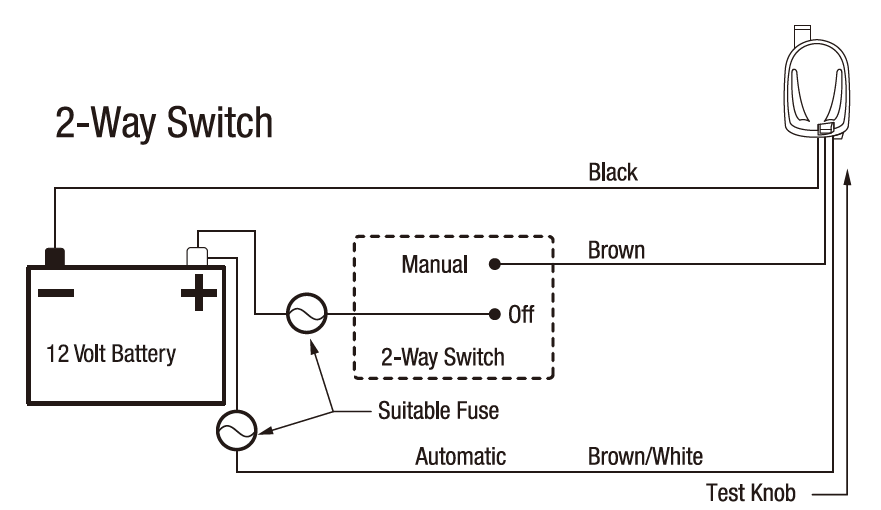
How to Use 800 GPH Automatic Bilge Pump #BT6188 On 2-Way Switch:
- Connect the Ground (Negative)
- Connect the Black wire from the bilge pump directly to the negative (–) terminal of the battery.
- Ensure the connection is secure and use heat-shrink or marine-grade connectors if available.
- Install the Fuse on the Positive Line
- Connect an inline fuse holder to the positive (+) battery terminal.
- Install the correct size fuse (check your pump manual).
- From the fuse, run a negative wire to the toggle switch.
- Manual Switch Connection
- From the fuse, run a positive (+) wire to the toggle switch.
- Connect the brown wire from the bilge pump to the “Manual” terminal on the toggle switch.
- This allows the pump to run when you flip the switch to Manual.
- Automatic Connection
- Connect the brown/white wire from the bilge pump directly to the positive (+) line coming from the fuse (before the switch).
- This provides constant power for automatic operation when water is detected.
- Test the Pump (reference video link):
- Twist the "Test Knob" clockwise until it *clicks* and the pump engages